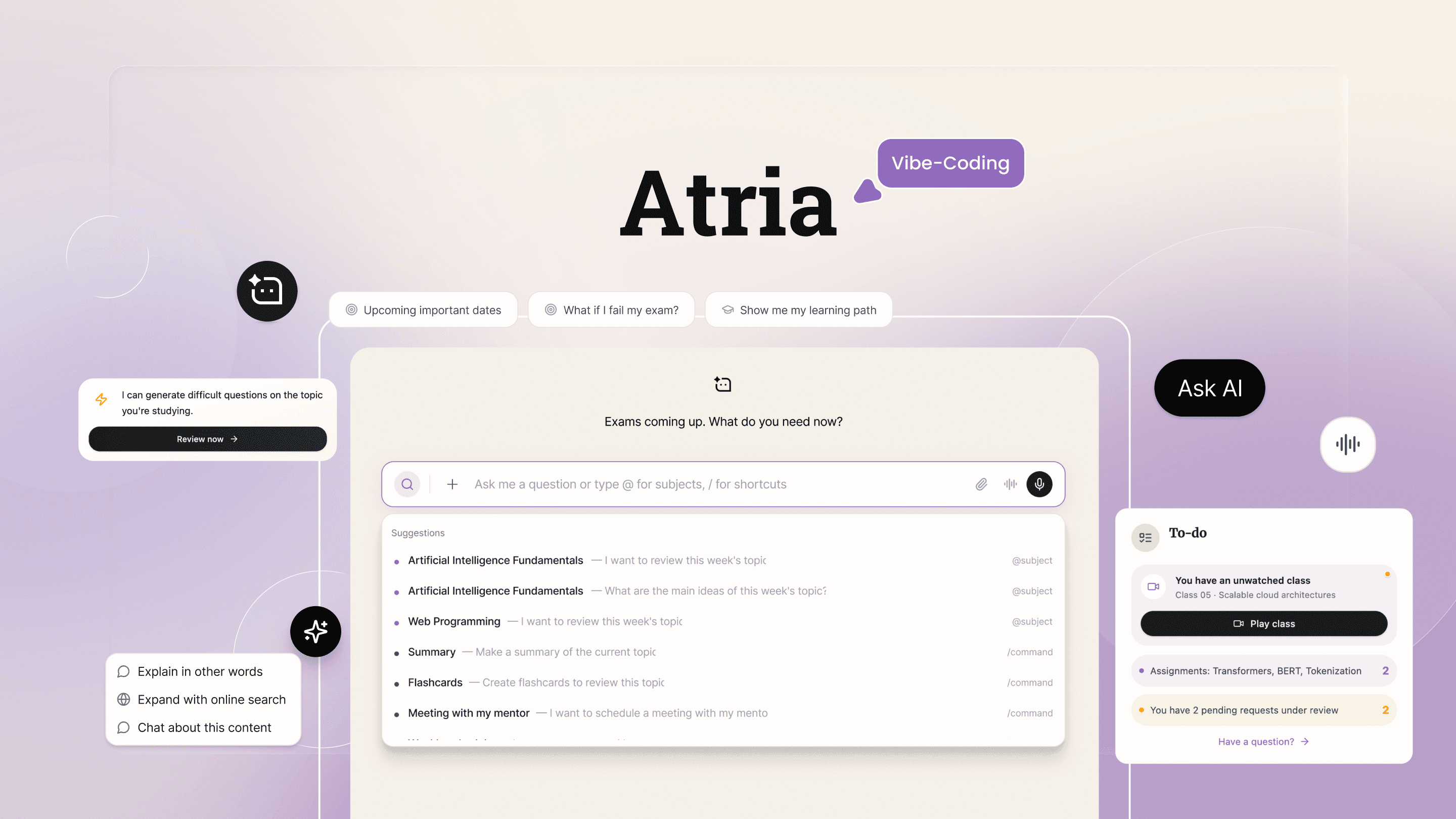
Overview
This project redesigns the student experience by embedding AI as a transversal orchestration layer rather than isolated tools.
At International Online University, students interact with multiple digital products throughout their academic life: administrative platforms, study tools, support services, and practice environments. Although functional, the experience was fragmented, reactive, and cognitively demanding.
The objective was to design a unified AI-first system that guides, anticipates, and supports students across key academic moments, without replacing human mentorship or professors.
Problem statement
The existing student experience was fragmented across multiple platforms, each offering AI capabilities in isolation. Students repeatedly asked themselves:
Which AI should I ask, and for what?
Focus groups conducted for the previous administrative chatbot revealed confusion, duplicated guidance, and low confidence in AI responses. Interviews with students using the study assistant showed parallel usage of external AI tools without institutional guidance.
Research and analysis
Research process
Research combined multiple inputs:
- Focus groups conducted for the existing Campus Assistant
- Interviews with active students using the Learning Assistant
- Benchmarking of AI-first products with conversational cores
- Internal knowledge of recurring support requests and student pain points
The focus was identifying behavioral patterns explaining low AI adoption despite high availability.
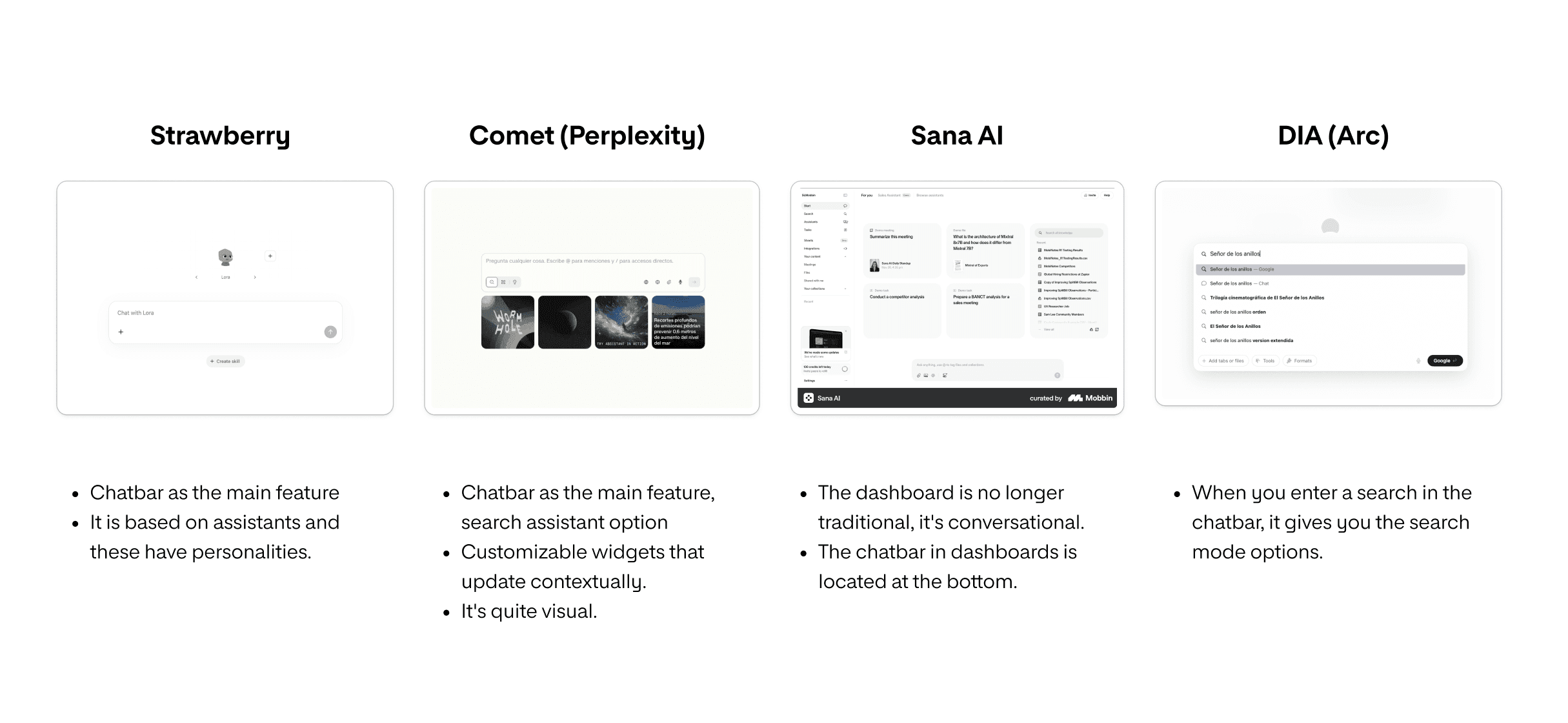
Strategic core
AI-first vision
An AI-first model restructures how context, decision-making, and system intelligence operate within the product. AI is embedded as infrastructure, not layered as an interface.
The shift moves the platform from:
- Static dashboardsContext-aware guidance
- Reactive Q&AProactive suggestion
- Fragmented toolsUnified orchestration
- Feature navigationDecision support
The system follows these AI-first principles:
| Key principles | What it means in practice | Application in the AI experience |
|---|---|---|
| Conversation beyond Q&A | AI supports flows and decisions, not only isolated questions. | Guide tasks, suggest paths, anticipate next steps, and maintain continuity. |
| Proactive suggestion | Actions are surfaced based on academic context without waiting for user input. | Surface next steps, relevant alerts, and useful options at each moment. |
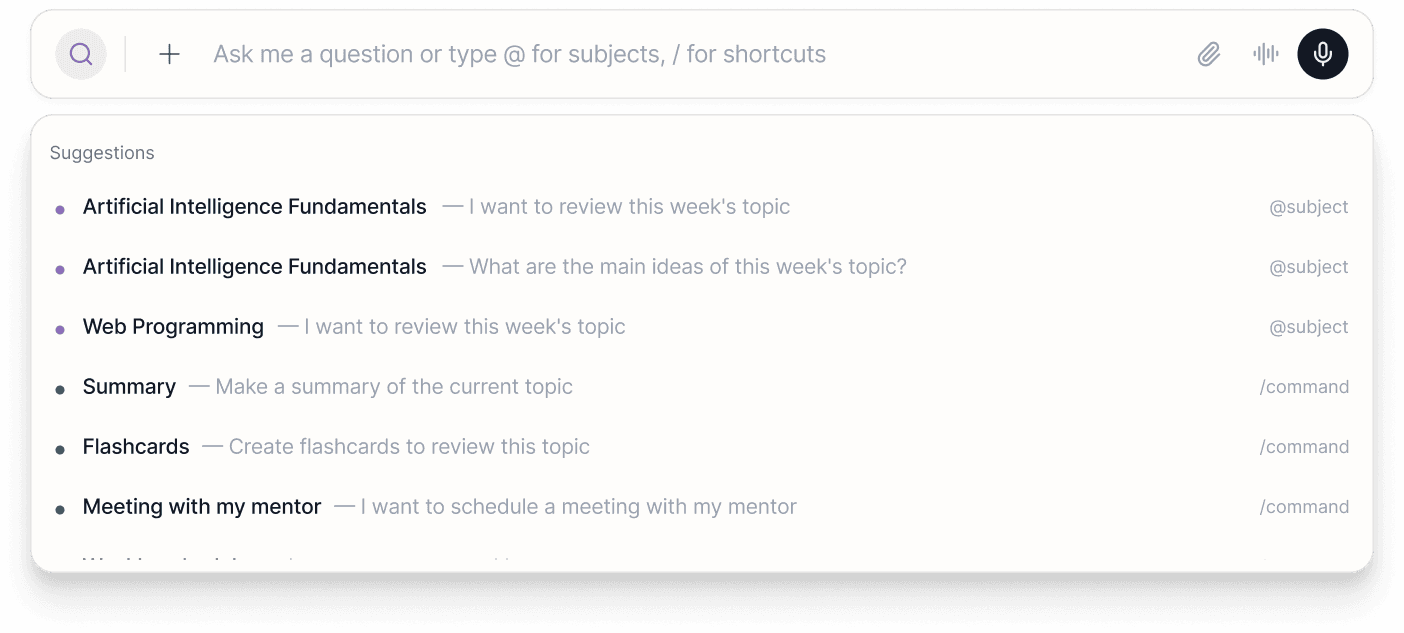
| Guided prompting | Structured suggestions and shortcuts reduce ambiguity and lower entry barriers. | Chips, examples, templates, and structured prompts that reduce friction when starting a request, including shortcuts such as / and @. |
| Context unification | The system understands where the student is in their journey and adapts accordingly. | Calendar, OneDrive, Office tools, course materials, and assignments accessible within the same conversational layer. |
| Action-oriented responses | Outputs are tied to real system actions (calendar updates, resource access, scheduling). | Responses dynamically adjusted to academic progress, deadlines, courses, and current needs. |
| Multimodal interaction | Text, voice, and contextual UI triggers coexist within the same framework. | Input and output through text, voice dictation, or real-time voice interaction. |
Intent architecture and orchestration logic
Unifying assistants required more than merging interfaces: it required defining how the system understands intent.
A structured taxonomy was developed to classify recurring student queries across the entire academic lifecycle. Rather than organizing by features, queries were clustered by intent type and expected outcome.
Two primary domains emerged:
Each domain was further broken down into:
- Sub-intent clusters (e.g., exams, enrollment, evaluation, thesis)
- Keyword patterns and semantic triggers
- Expected system actions
- Contextual academic moments
This taxonomy became the orchestration backbone. Instead of asking students to decide which assistant to use, Atria classifies intent in the background and routes the interaction accordingly. The responsibility shifts from the user to the system.
Handling ambiguity and edge cases
Ambiguous queries and uncertainty scenarios were explicitly mapped. For each case, predefined behaviors were designed:
- Clarification prompts when intent confidence is low
- Escalation pathways to human mentors when academic authority is required
- Guardrails preventing AI overreach in evaluative or institutional decisions
This ensures orchestration is not only intelligent, but controlled.
System thinking: designing for academic moments
What it means in practice
Rather than organizing the experience around features, Atria was structured around student moments. Academic journeys are defined by phases and emotional states:
- 01Onboarding and early adaptation
- 02Daily study
- 03Exam preparation
- 04Administrative management
- 05Thesis development
- 06Closing cycles
Each academic moment requires a distinct AI posture (activating, guiding, structuring, prioritizing, or stabilizing) based on context and urgency. For example:
- During onboarding
- The AI activates, reassures, and structures first steps.
- During daily study
- It accompanies, clarifies, and organizes workload.
- During exam week
- It anticipates deadlines and prioritizes revision.
- During thesis work
- It guides process clarity without replacing academic authority.
Example: contextual messages on the student's dashboard
New day, new opportunity. Shall we review what exams you have this week?
Want to see your submissions and exams organized by priority?
I can generate difficult questions on the topic you're studying.
What do you have pending before the exam? I can review it.
Good work today. Want a summary of what you progressed?
It's been days since I logged in. Want to review together what to study today?
How the system is structured
System architecture and navigation model
The platform architecture was designed to preserve the existing academic structure while embedding AI as a transversal orchestration layer. Core experience modules remain intact, while Atria augments them through contextual functions, prompt suggestions, and action-driven intelligence.
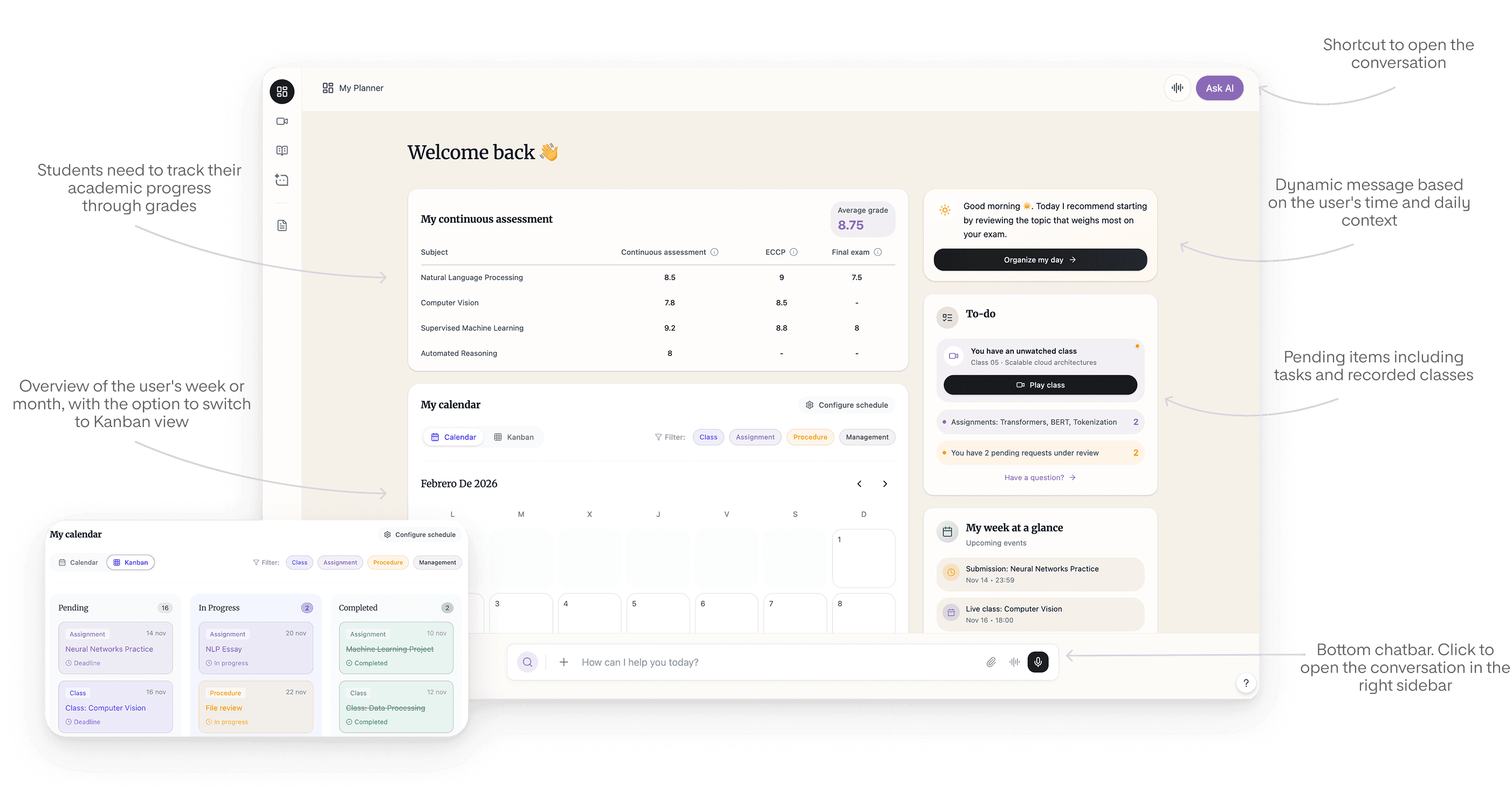
- My planner
- Continuous assessment
- Calendar
- Contextual AI call to action
- To-do
- Week at a glance
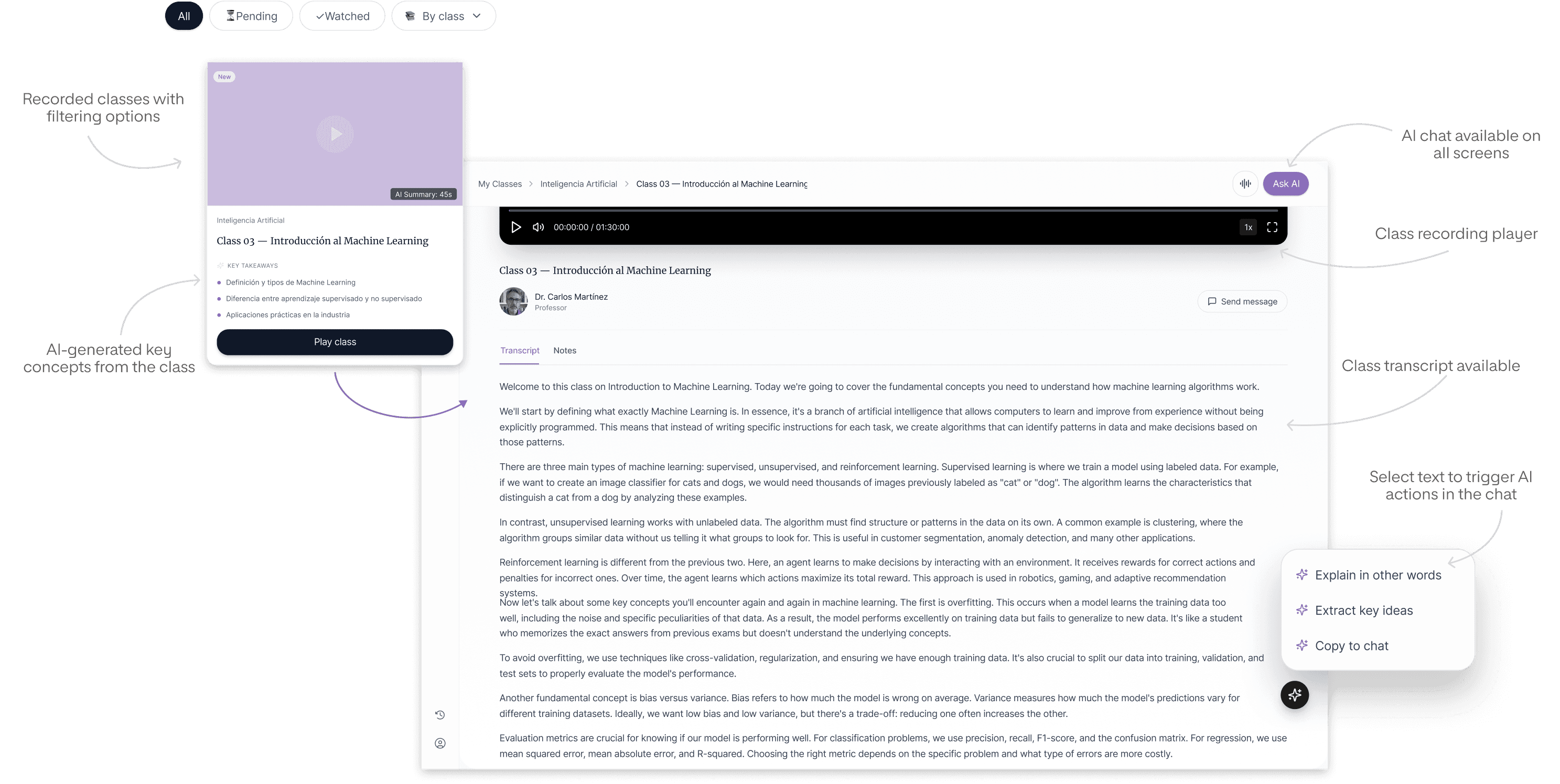
- My classes
- Recording
- Transcription
- Notes
- AI contextual functions
- Key ideas
- Explain in other words
- Send to chat
- Create new note
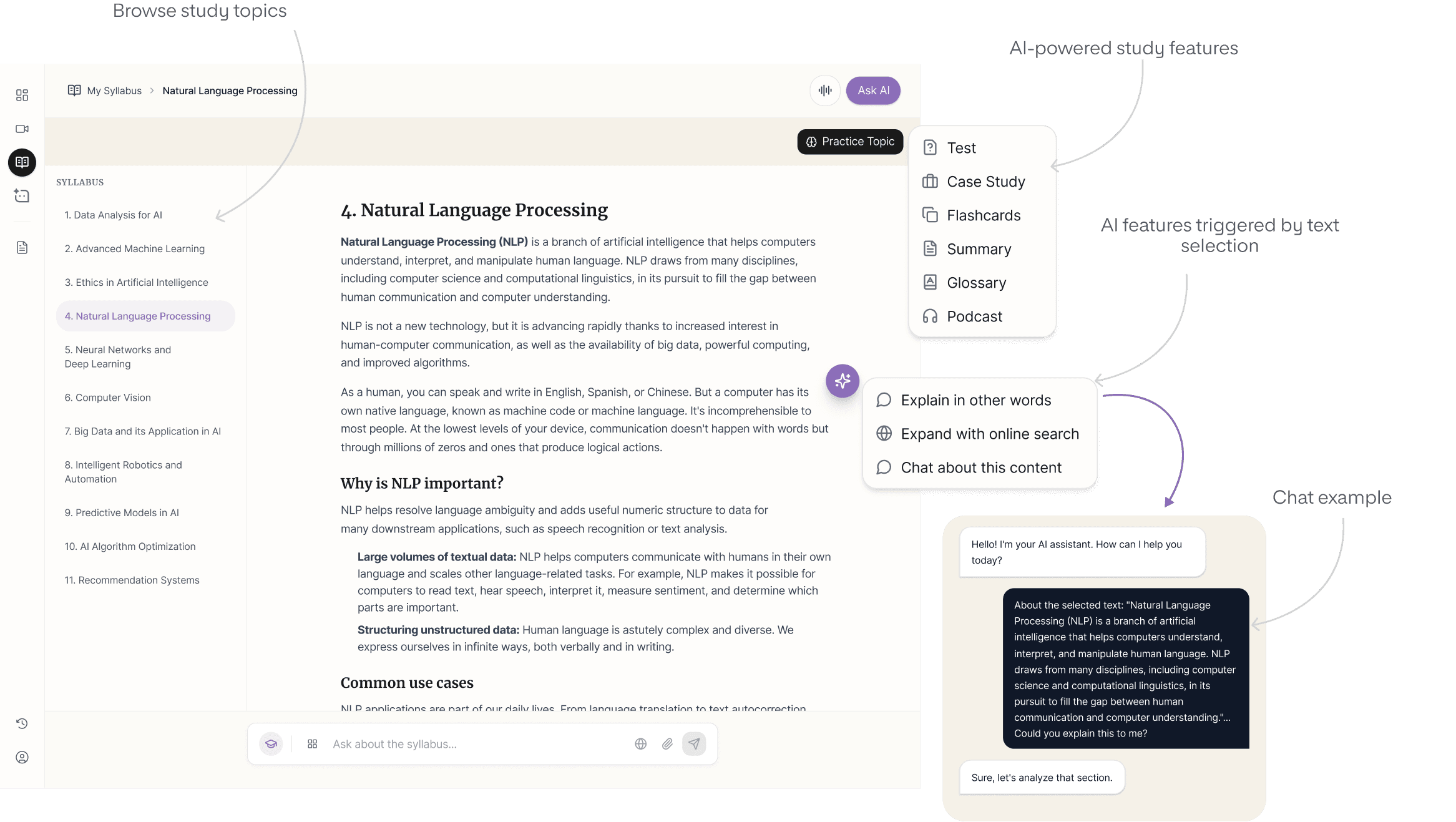
- My syllabus
- All topics
- AI contextual functions
- Explain in other words
- Explain using web sources
- Chat about this content
- Practice topic
- Flashcards, tests, summary, glossary, podcast, case study
- AI contextual functions
- All topics
- Chat with Atria
- Conversation input
- Contextual prompt suggestions
- @ for topics and / for commands
- Integrations
- OneDrive, Canva, Notion
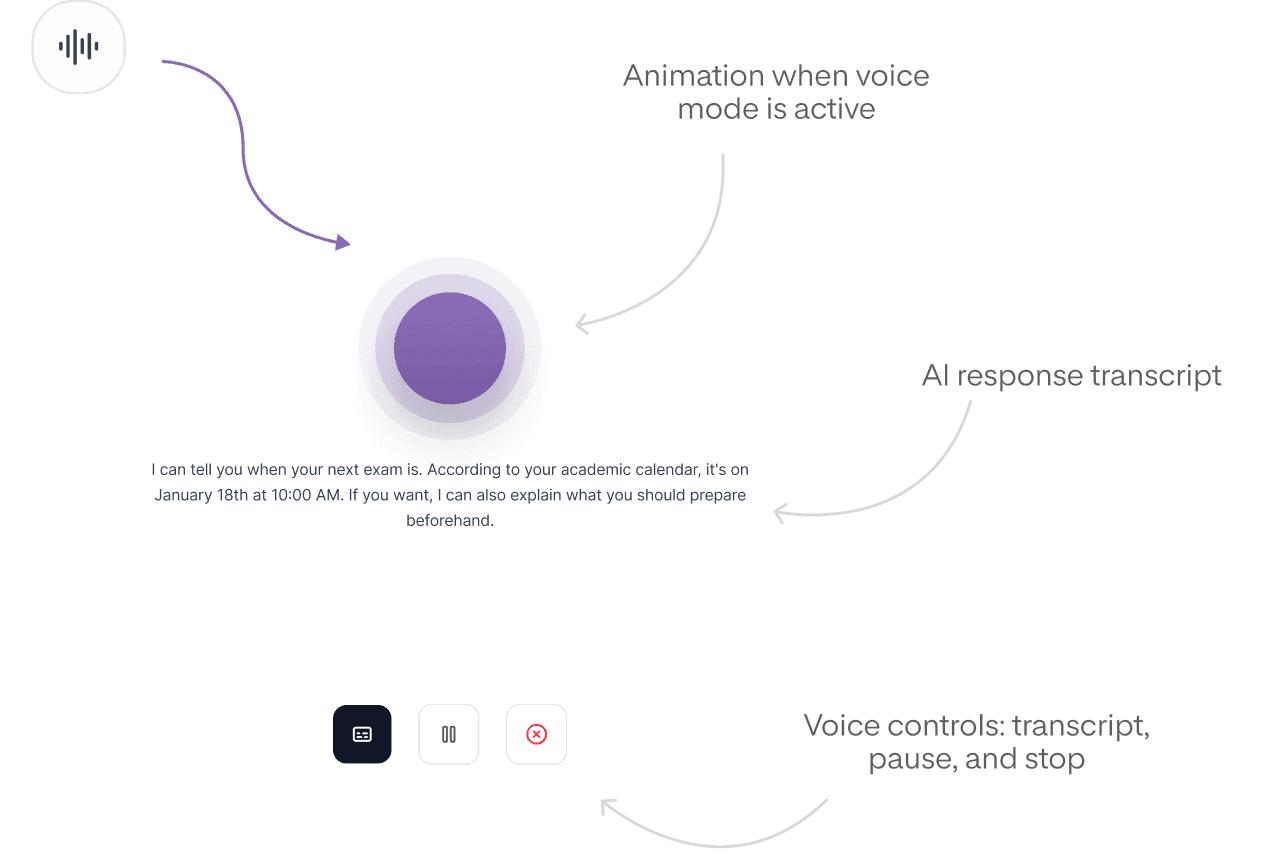
- Real-time voice conversation
- Transcription
- Dictate by voice
- Contextual prompt suggestions
- Conversation input
- Requests
- Request management
- Open requests
- New request
- Request management
- Profile
- Chat history
AI Specific AI functions
Designing the AI experience
Human-centered AI
Atria follows Human-Centered AI principles. The AI's primary value lies in structured guidance and contextual support:
- 1The AI suggests and supports; humans decide.
- 2Mentors remain the emotional and strategic reference.
- 3The system is transparent about its role and limitations.
- 4Errors and uncertainty are handled through escalation, not concealment.
The chat as orchestrator
The conversational interface was designed as a persistent secondary interaction layer, embedded across all sections of the platform rather than acting as a standalone destination.
Within contextual conversations, students can:
- Check deadlines and academic status
- Organize their study schedule
- Access learning resources
- Resolve administrative tasks
- Decide when to escalate to human support
The chat is available in multiple contexts: the "Chat with AI" page, the sidebar, and full-screen mode, adapting to the student's moment.
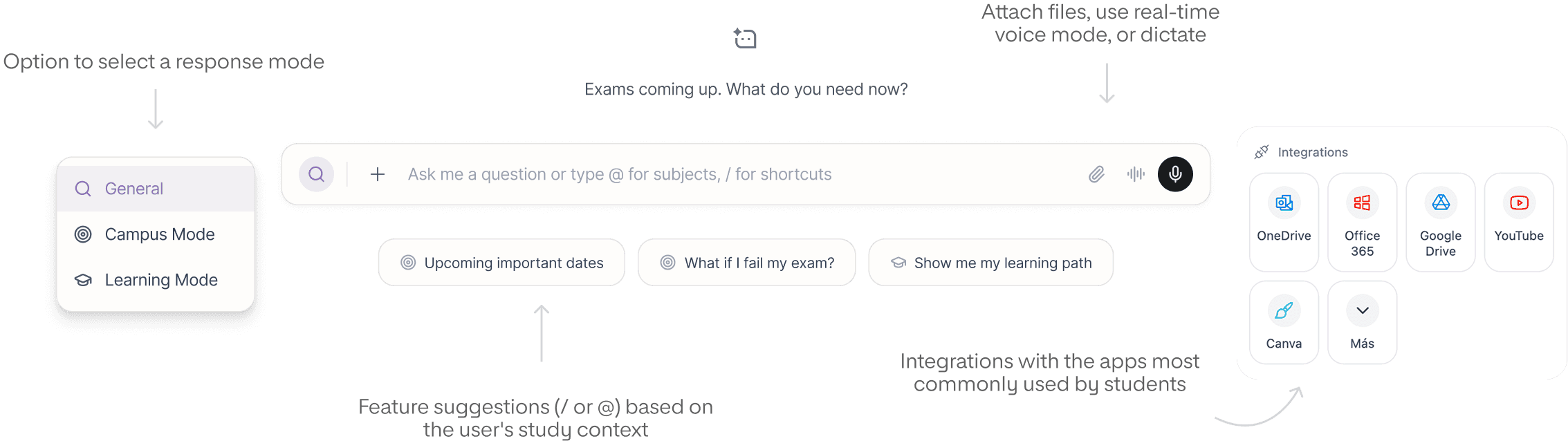
Guided interaction and contextual prompts
Structured prompting and contextual suggestions replace fully open-ended input models. Shortcuts, suggested prompts, and contextual actions help students express intent without needing to "know what to ask":
- Context-aware suggestions
- Guided prompts using shortcuts (/ for commands and @ for themes)
- Actionable responses connected to real data
- Integration with commonly used tools (calendar, files, study resources)
Prototype and iteration
The system was prototyped using Figma Make to validate interaction patterns and orchestration logic. Documentation and prompting workflows were supported by Notion and Claude, focusing on interaction patterns rather than final UI.
Dashboard: planning and proactive guidance
A dedicated planning view allows students to see their academic workload across weeks or months. The AI proactively suggests study windows, highlights priorities, and adjusts recommendations based on progress and habits.
Contextual AI support within class recordings
AI-augmented syllabus navigation
Real-time voice interaction layer
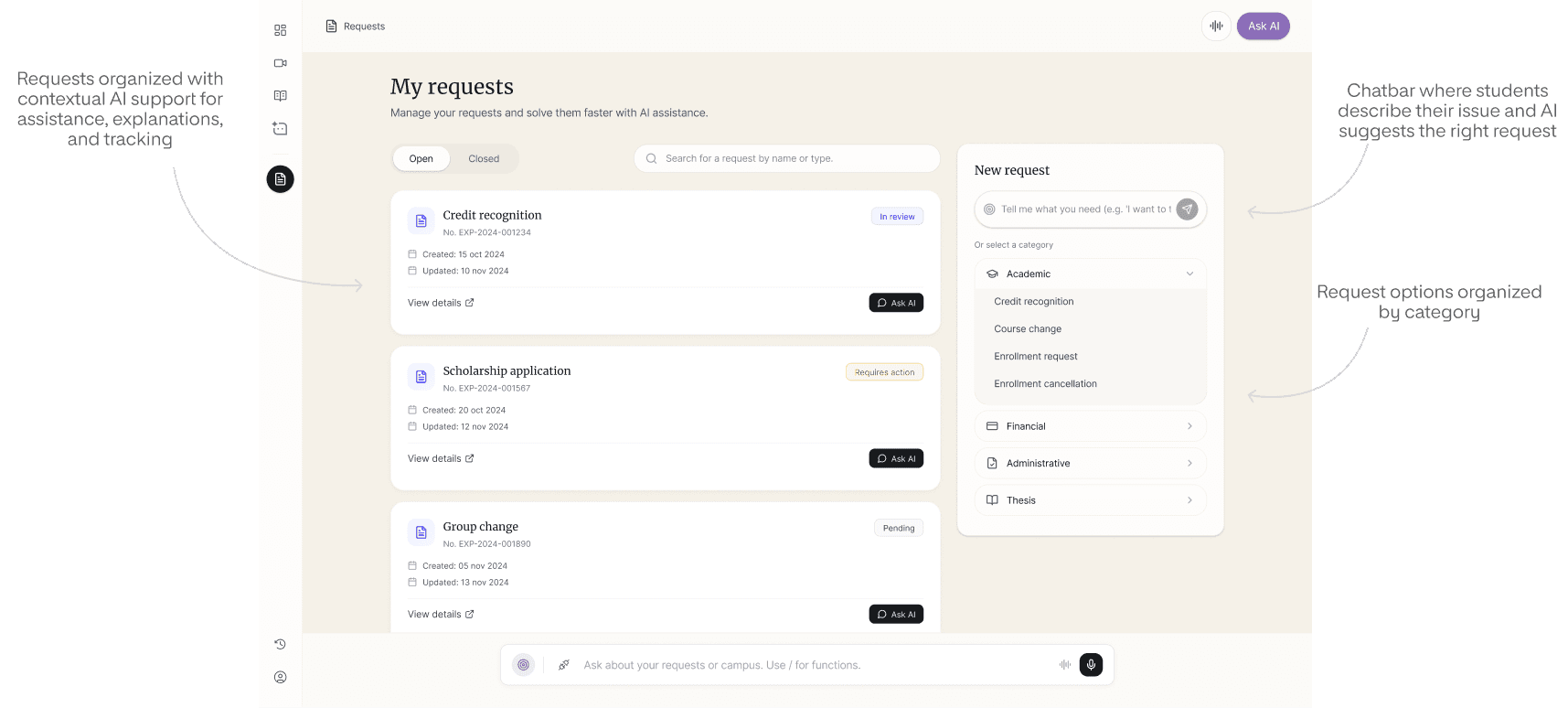
AI-assisted request management
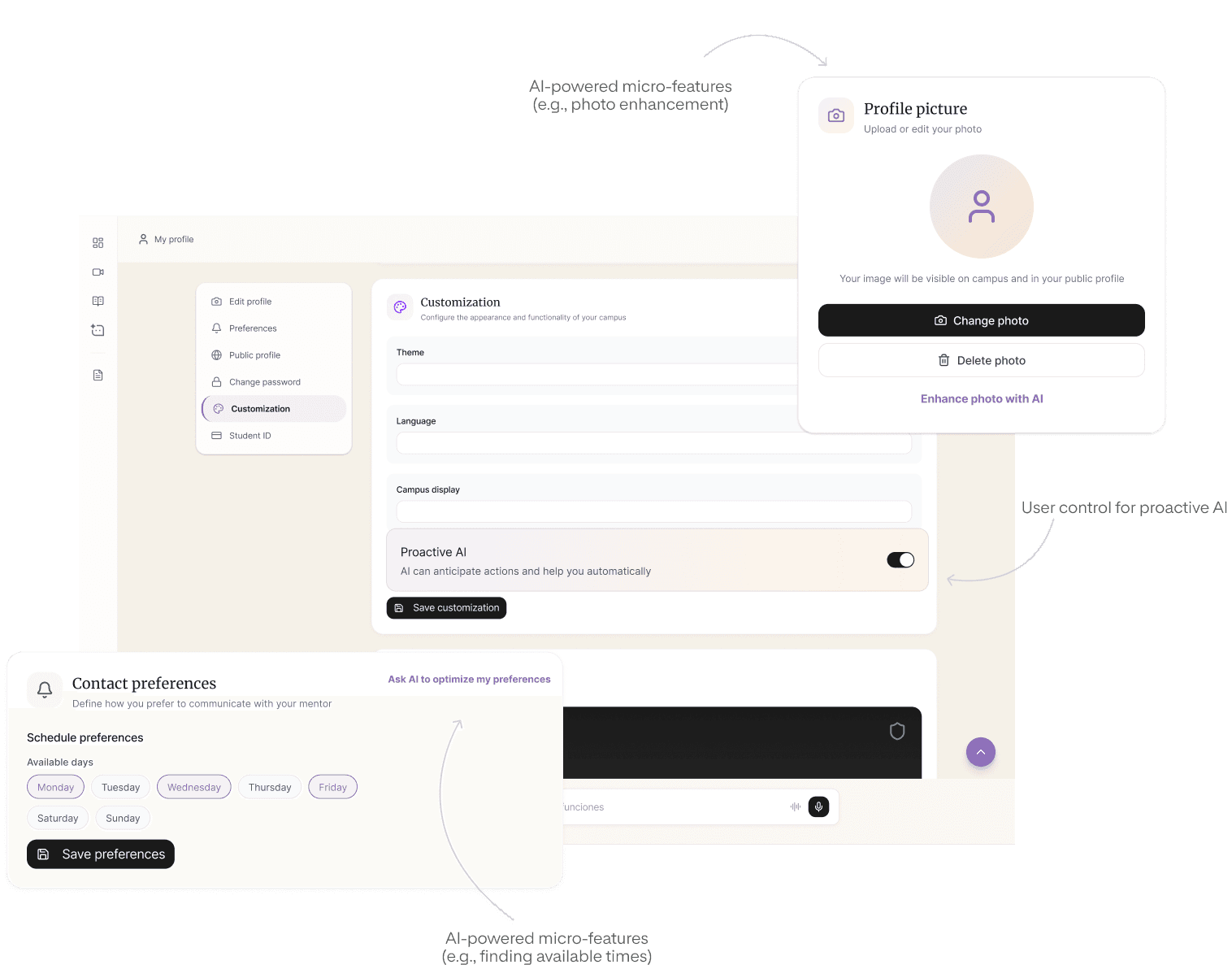
Personalization and academic profile layer
Evaluation
Evaluation and trade-offs
Evaluation focused on validating AI posture, clarity of guidance, and behavioral consistency across academic flows.
As the product remains in development, evaluation has been conducted through early focus groups and stakeholder reviews. These sessions validated orchestration clarity and revealed important constraints.
- 1Video-level AI analysis of recorded classes was intentionally excluded due to technical immaturity and high cost.
- 2The system avoids over-automation to prevent replacing human academic roles.
- 3Some advanced curriculum visualization features remain in progress to avoid feature overload.
Strategic learnings
Next steps
This project reinforced several key learnings:
- 01Designing AI is designing decision systems, not interfaces.
- 02Context is more important than model capability.
- 03AI experiences require rhythm, pacing, and micro-decisions.
- 04The best AI teaches users how to use it while being used.
Next iterations will focus on:
- Deeper personalization through behavioral modeling
- Expanded proactive academic planning
- Stronger mentor-AI collaboration models
- Development of a formal design system and production-ready UI
- Technical documentation for scalable AI handoff
As the system evolves, updates in AI capability and engineering feasibility will continue to refine orchestration logic.
Good AI design feels invisible, until you realize how much easier things became.
All names and references in this case study are fictional and used solely for anonymization purposes.